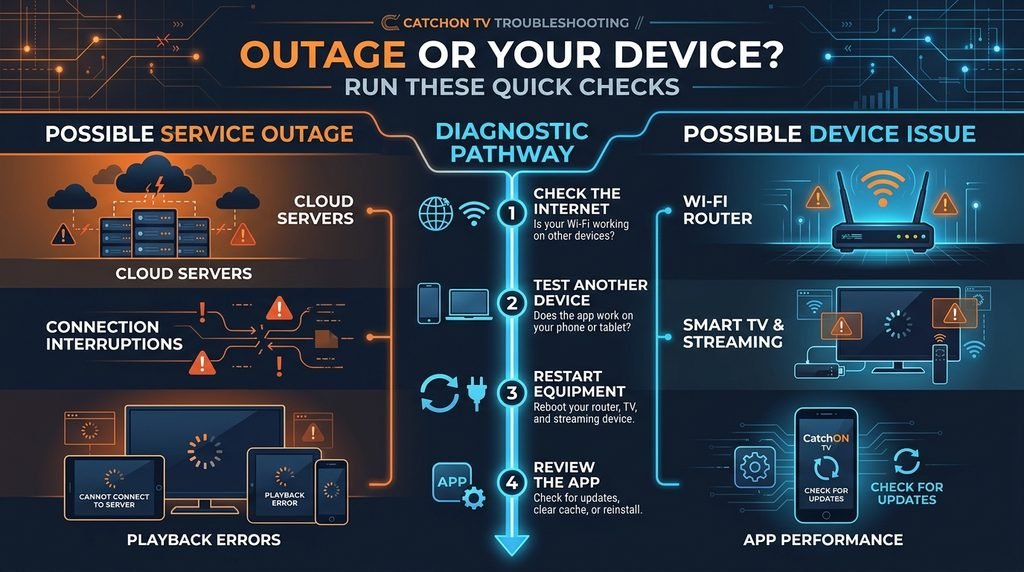
Is CatchON TV down today? As of October 21, 2026, the available research does not confirm a live outage affecting every CatchON TV service. Some earlier community reports described serious service problems, but the right next step is to check your connection, test another device, and look for current confirmation from your actual provider before assuming the entire service is offline.
Table of Contents
Is CatchON TV Down Today? What Can We Verify?
The phrase “CatchON TV down today” can describe a genuine provider outage, a regional stream failure, an account problem, or a device that cannot load its player. Available evidence does not establish a confirmed, service-wide outage on October 21, 2026, so users should distinguish verified information from older reports and individual playback problems.
What do the recent reports actually say?
Public discussions in the r/CatchOnTV community describe significant problems with a CatchOnTV-branded service during July and August 2026. Users reported live channels failing, websites becoming inaccessible, and difficulties opening the app or using credentials. These posts document what individual users experienced; they are not an independently verified incident report.
The dates matter. Reports from July 25, July 26, or August 6 cannot establish whether the service is operational today, and one user’s experience cannot establish the status of every provider using a similar name.
During this research, no independently verifiable, current official status notice confirming a service-wide outage was found in the results reviewed.
Why website access does not prove streaming works
A provider’s homepage, sign-in page, streaming app, and individual playback servers may behave differently. A website can load while channels fail, and a player can open even when the account cannot authenticate or the requested stream is unavailable.
The catchontvusa.us website was accessible during this research. However, access to its webpages alone cannot confirm successful playback or establish that it operates the same service mentioned in the historical community reports.
For an accurate check, identify the exact provider and account you use. Confirm any announcement through the support channel associated with that account rather than relying solely on an old Reddit post, an unofficial mirror, or an unfamiliar website.
Key takeaway: Historical complaints can help explain why people search for CatchON TV outage information, but only current evidence can establish a current outage.
How Can You Tell Whether It’s an Outage or Your Device?
The fastest way to narrow down a CatchON TV problem is to compare what happens across devices, internet connections, and types of content. If the same failure occurs on multiple devices and networks, a provider-side problem becomes more plausible; if only one device fails, investigate its app, settings, and connection first.
Run these quick checks
Check your internet connection. Open a trusted website or another streaming application on the same device. If neither loads, investigate your internet connection before blaming CatchON TV.
Test another channel or title. If one live channel fails but other channels or on-demand titles play, the fault may be limited to a stream or content source.
Try another device. If you normally use a Fire TV Stick, try a compatible phone, tablet, or television using the same account, provided your subscription and setup support it.
Compare networks. Test a second trusted connection where practical, such as mobile data on a phone. Avoid changing multiple settings at once, so you can identify which condition makes a difference.
Look for current confirmation. Check your provider’s actual support channel for a recent maintenance notice or outage update, and record when the problem began.
Official device guidance supports checking connectivity, restarting affected equipment, and updating software when streaming fails. See Amazon Fire TV Support, Google TV Help, and Apple’s streaming troubleshooting guide. These are device troubleshooting references, not confirmations of CatchON TV’s service status.
CatchON TV troubleshooting matrix
Link-worthy asset · Updated October 21, 2026 · Based on public community reports and official device-support documentation; no hands-on CatchON TV stream tests were performed.
What you observe
Most useful next check
What the result may indicate
No apps or websites connect
Test the internet on another device
A local network or internet-provider problem
CatchON TV opens, but one channel fails
Try another channel or on-demand title
A channel-specific or stream-specific issue
The app closes or freezes on one device
Restart the device and reopen the app
A local app or device problem
Login fails or credentials are rejected
Check account details and provider instructions
An account, authentication, or configuration issue
Playback fails on multiple devices and separate networks
Check a current provider notice and contact support
A provider-side issue is more plausible
The website loads, but every stream fails
Check the actual streaming service status
Website availability does not confirm stream availability
This matrix is a diagnostic guide, not a guarantee. Several problems can produce identical symptoms, so a single failed channel or login attempt is not sufficient evidence that the entire service is down.
Key takeaway: Test one variable at a time. Comparing devices, connections, and multiple channels provides better evidence than repeatedly reinstalling an app or resetting a television.
How Do You Fix CatchON TV When It Won’t Load?
Start with reversible fixes before changing credentials, reinstalling software, or resetting a television. Check connectivity, restart the device, reopen the player, and verify account details in sequence; if playback still fails across different devices and networks, further changes to your own equipment may not resolve a provider-side issue.
Restart your connection and streaming device
Step 1: Restart the affected streaming device.
Close the streaming app and restart the Fire TV Stick, Android TV device, Smart TV, or other compatible hardware you use. For a Fire TV device, Amazon provides specific instructions for restarting the device and resolving app or connection issues.
Step 2: Restart the router if other services also have problems.
If multiple devices are experiencing network issues, restart your router according to your internet provider’s instructions. Allow the connection to return before testing the streaming application again.
Step 3: Reopen the app and test again.
Launch the player and test one channel that previously failed. Then try a different channel to determine whether the problem affects the whole service or only one stream.
Check the app, account, and playback settings
Step 4: Confirm that your account is active.
Check your subscription information, expiry date, and account details through your actual provider. If credentials were recently changed, follow the provider’s documented instructions rather than entering login details into an unfamiliar website.
Step 5: Check for app or device updates.
Install relevant updates from the official application store or your device manufacturer’s update menu. Amazon’s troubleshooting guidance includes checking device software and app updates when playback problems occur.
Step 6: Clear the app cache if your device supports it.
Some devices let you clear temporary app data without deleting the entire application. The precise menu depends on the device and player, so follow the relevant official instructions and avoid selecting options that erase saved account information unless you know how to restore it.
Step 7: Avoid reinstalling or resetting too early.
Before reinstalling a player, make sure you can obtain the official application and restore your legitimate access credentials. A factory reset is a last resort for persistent device problems, not a sensible first response to a suspected provider outage.
Try an illustrative troubleshooting scenario
Illustrative example—not a real customer case or a tested CatchON TV result.
Imagine that a user cannot load a live channel on a Fire TV Stick. Another channel plays successfully, and the same device can access other streaming services.
The user then restarts the player and tests the original channel again. If the same channel still fails while other content works, a channel-specific or provider-side problem becomes more plausible than a complete internet outage. The next step is to check with the actual provider, not to reset the entire television immediately.
If all channels fail on the Fire TV Stick but play on another compatible device, the investigation should instead focus on the original device, player configuration, or network path.
Key takeaway: Choose the next fix based on the symptom. Restarting or updating a device can address local faults, but it cannot guarantee that an unavailable remote stream will return.
When Should You Contact Support or Stop Troubleshooting?
Contact your provider when the same problem persists across compatible devices and independent network connections, or when login credentials are rejected despite being entered correctly. If the provider confirms maintenance, avoid repeatedly changing your device settings; save the error details and wait for an official update before retesting.
What information should you send to support?
A useful support request should describe the problem precisely enough for the provider to distinguish an account problem from a stream or device failure. Include:
The date and approximate time the problem began, including your time zone.
Your device model and the name of the player application.
Whether live channels, on-demand content, or both are failing.
The exact error message, if one appears.
Which basic checks you completed and whether another device or connection worked.
Never send your password, payment-card information, or full account credentials through an unverified support link. Use the contact method already associated with your subscription.
If you need to check content availability, the CatchON TV channel list provides a reference for listed content, while the CatchON TV website provides information about the service advertised there. These pages should not be treated as live outage monitors or proof that an individual stream is available.
Frequently asked questions
Is CatchON TV down today?
A service-wide outage has not been independently confirmed for October 21, 2026. Earlier online reports describe problems with a CatchOnTV-branded service, but they do not verify current status for every provider using the name.
How can I tell whether CatchON TV is down or my internet is failing?
Test other websites or streaming apps, try another channel, and compare a second device or network. If only one device fails, investigate its app and settings; if failures occur across devices and networks, contact your actual provider.
Why does CatchON TV open but channels won’t play?
A website or app can load even when an individual stream, account authentication, or playback endpoint is unavailable. Test other channels and check for a current notice from the provider.
Should I reinstall the CatchON TV app?
Not as the first step. Restart your device, check connectivity and account details, and confirm you can reinstall the correct app and restore your credentials before deleting anything.
Where can I check CatchON TV outage updates?
Use the verified support channel associated with your account and compare reports by date. Treat forum posts as individual reports, not official status announcements, unless the provider confirms the incident.
Your next step
Check another channel and another streaming app first. If other services work but CatchON TV continues to fail across devices or networks, contact the provider associated with your subscription and request confirmation of the current service status.